Introduction
This page explains the meaning and intended usage of each Organization Status available in SAFE. The status helps track where a vendor or third-party stands in the risk management lifecycle and ensures consistent governance across assessments.
SAFE offers six distinct statuses to help organizations effectively track and manage the lifecycle of their third-party vendors:
Awaiting Details – Assessment initiated; waiting for vendor responses or documents.
Ready for Review – All required details received; assessment can begin.
Approved – Vendor meets risk standards and is cleared for use.
Contingent Approved – Conditionally accepted; minor gaps pending remediation.
Rejected – Vendor failed to meet security or compliance requirements.
Offboarded – Vendor no longer in use; contract or engagement ended.

Awaiting Details
Indicates that the vendor’s risk assessment process has been initiated but is pending required information.
When to Use:
Questionnaires have been sent to the vendor, and you are awaiting responses.
Evidence, security documentation, or compliance reports are pending submission.
Example Scenarios:
A new vendor has been onboarded, and the assessment questionnaire is awaiting completion.
The vendor has been asked to upload their SOC 2 report, but has not yet provided it.
Ready for Review
The vendor has provided the required details, and the risk assessment is ready to begin.
When to Use:
The vendor has submitted all requested evidence, questionnaires, and compliance documentation.
No major information gaps remain, and the internal risk team can start evaluating the submission.
Example Scenarios:
The vendor has uploaded their completed questionnaire and supporting documents.
Approved
The vendor has successfully passed the risk assessment and is approved for business use.
When to Use:
The vendor meets your organization’s risk standards.
No outstanding issues or exceptions are present.
Vendor is actively in use by the business and considered secure.
Example Scenarios:
A SaaS vendor has been reviewed and deemed low risk.
The vendor’s SOC 2 Type II report and security practices meet internal requirements.
Contingent Approved
The vendor is conditionally acceptable for use but requires additional monitoring or temporary acceptance.
When to Use:
Vendor has minor gaps (e.g., delayed SOC report, pending remediation steps) but is not considered an immediate risk.
Vendor is being onboarded as part of a Proof of Concept (POC) before a full assessment is complete.
Vendor is nearing end-of-life or scheduled for de-provisioning but remains in limited use.
Example Scenarios:
Vendor’s annual penetration test results are delayed, but business needs require continued use in the meantime.
Vendor is under consideration for a POC while the full due diligence process is pending.
Rejected
The vendor has been assessed and determined unacceptable for use due to high risk or failure to meet compliance requirements.
When to Use:
Vendor fails security, compliance, or contractual requirements.
Risk exceeds acceptable thresholds, and exceptions cannot be justified.
Example Scenarios:
Vendor does not encrypt sensitive data and cannot remediate.
Vendor refuses to provide necessary compliance documentation.
Offboarded
The vendor is no longer in use and has been formally removed from your vendor ecosystem.
When to Use:
The vendor’s contract has expired or been terminated.
Business no longer relies on the vendor’s services.
Vendor has been replaced with an alternative provider.
Example Scenarios:
A cloud storage provider was replaced with another vendor.
A SaaS product is no longer required and has been fully de-provisioned.
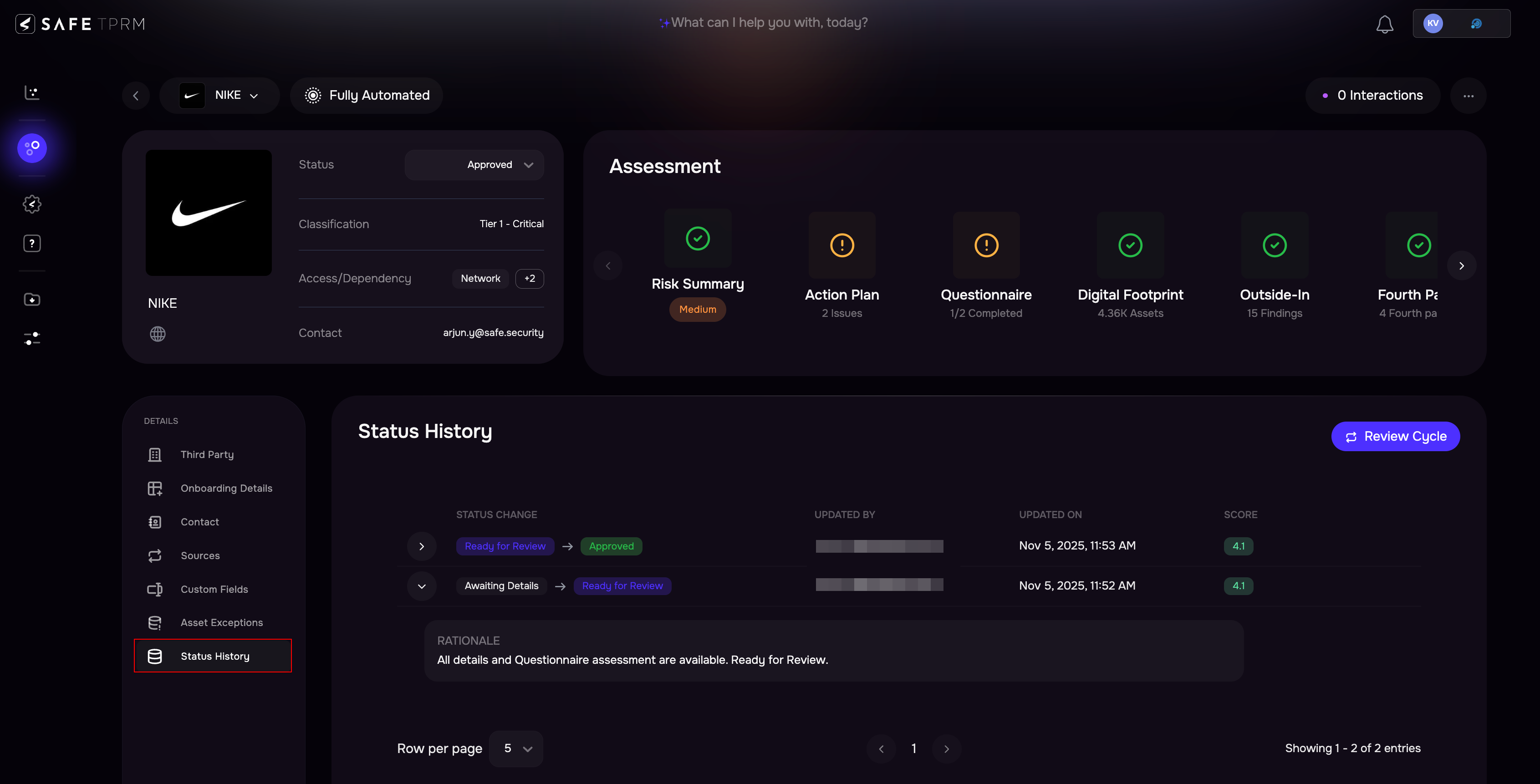
Status History
Each time a third-party’s status changes (e.g., from Ready for Review > Approved or Contingent Approved > Rejected), the following details are captured:
Last Updated By: Name of the user who changed the status
Updated At: Timestamp of the update (for Approved and Contingent Approved, this serves as the Last Review Date)
Status Change: Displays the transition (e.g., From → To)
Rationale: Explanation or reason for the change
Score: Risk score at the time of update
This ensures full visibility into all acceptance and rejection decisions. Third-party Status History is accessible on the third-party details page.