1. Container Image Inventory Unification
1.1 Overview
Managing container images in complex, multi-cluster environments requires a unified and normalized approach. Container image metadata is distributed across clusters, registries, and running containers, often leading to visibility gaps and duplication. This document outlines the structure of container-related assets, key concepts around container images, the methodology for unifying image inventory, and the common challenges encountered during this process.
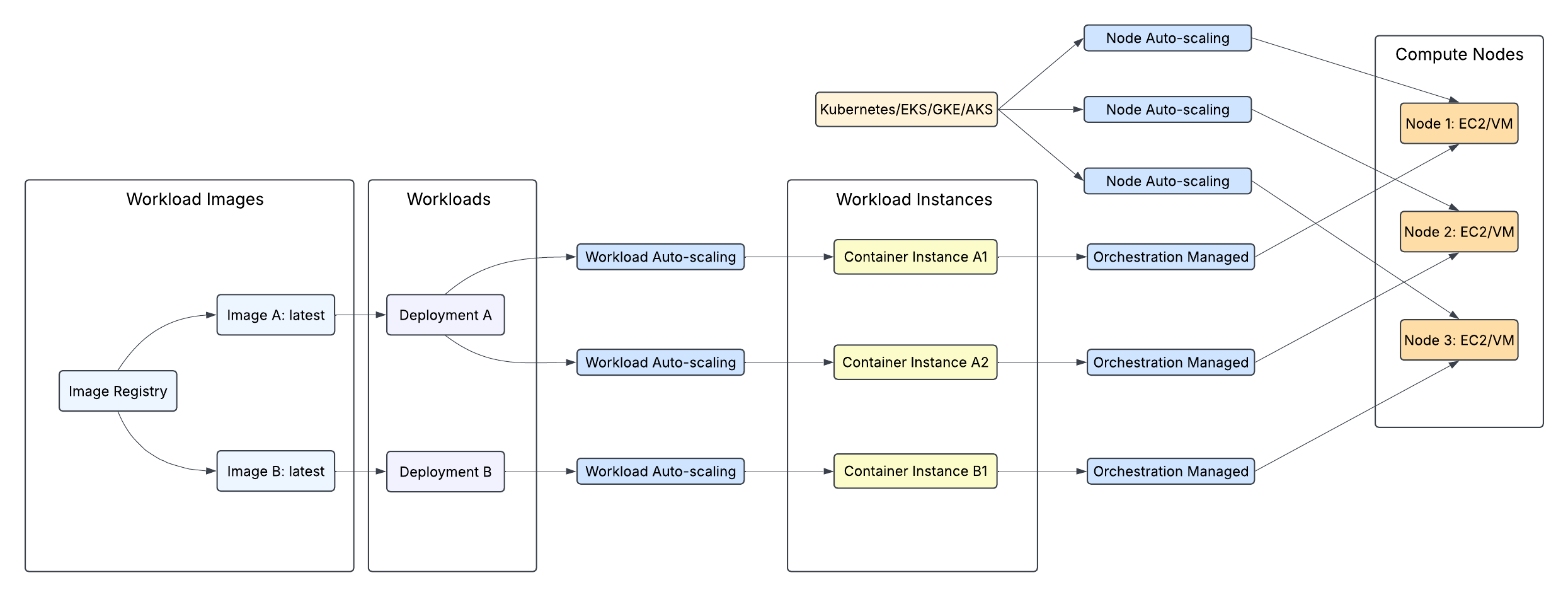
2. Container Ecosystem Asset Types
Container assets are categorized into four subtypes: Cluster, Image, Workload, and Instance.
2.1 Cluster
Clusters represent persistent orchestration environments where containers run. They are foundational infrastructure components.
Examples:
AWS Elastic Kubernetes Service (EKS)
Azure Kubernetes Service (AKS)
Google Kubernetes Engine (GKE)
On-premises Kubernetes clusters
Docker Swarm clusters
Red Hat OpenShift clusters
2.2 Image
Images are packaged application code and dependencies. They are persistent artifacts stored in registries.
Examples:
Application images (e.g., web servers, APIs, databases)
Infrastructure images (e.g., proxies, monitoring agents)
Utility images (e.g., backup tools, CI/CD components)
2.3 Workload
Workloads are configurations that define how container images should be deployed and managed within clusters. These definitions are persistent.
Examples:
Kubernetes Deployments
StatefulSets
DaemonSets
CronJobs
Jobs
ReplicaSets
2.4 Instance
Instances refer to the actual running containers instantiated from images, based on workload definitions. These are ephemeral and short-lived depending on workload type, scaling policies, and infrastructure conditions.
Examples:
Kubernetes Pods
Individual containers within pods
Docker containers
3. Container Image Concepts
3.1 Registry
A registry is a service that stores and distributes container images. Registries may be public or private and typically support access control features such as authentication and authorization.
Examples:
Docker Hub
Amazon Elastic Container Registry (ECR)
Google Container Registry
Azure Container Registry
GitHub Container Registry
3.2 Namespace
A namespace is a logical grouping within a registry, usually representing an organization, user, or project.
Example: In docker.io/nginx, nginx is the namespace in Docker Hub.
3.3 Image Name
The image name identifies a specific container image within a namespace.
Example: In docker.io/bitnami/postgresql, postgresql is the image name.
Note that the namespace and the image name together are referred to as the repository.
3.4 Image Tags
Tags are human-readable labels pointing to specific versions of an image.
Examples: latest, v1.2.3, stable, alpine
Note: Image tags are not part of the asset names or identifiers:
Tags are mutable pointers, not identifiers — The same tag (even version tags like v1.0) can point to different image content over time: on Monday app:v1.0 might refer to digest sha256:abc123..., but after a rebuild on Wednesday, the same app:v1.0 tag points to completely different content with digest sha256:def456....
Digests provide guaranteed immutability — A digest reference like registry/app@sha256:abc123... always refers to exactly the same image content, ensuring consistent tracking and eliminating potential confusion when the same tag gets reused.
Accurate audit trails require immutable references — In security incidents, knowing precisely which image ran is critical. With tag-based tracking, logs showing app:v1.0 become ambiguous (was it the vulnerable Monday build or Wednesday's fixed version?), while digest-based records provide forensic certainty.
Reliable deduplication depends on content addressing — The same image content can have multiple tags, and tags can point to different content over time, making them unsuitable for deduplication. Digest-based tracking ensures each unique image is tracked exactly once.
Time-series analysis becomes more meaningful — Daily ingestion with digest-based tracking shows clear transitions in image content:
Date | Image | CVEs | Comments |
|---|---|---|---|
2025-03-01 | app@sha256:abc123... | 3 | |
2025-03-02 | app@sha256:abc123... | 3 | |
2025-03-03 | app@sha256:def456... | 0 | Clearly shows a different image |
Tag information isn't lost — Using digest-based primary keys doesn't mean discarding tag information. We maintain a temporal mapping of which digests had which tags on which dates, preserving tag history while using digests as stable identifiers.
Industry best practices favor digest references — For production deployments, security-conscious organizations increasingly specify images by digest rather than tag to eliminate the risk of "tag sliding" and ensure reproducible deployments.
3.5 Digest and Repo Digest
Digest: A SHA-256 hash that uniquely identifies the content of an image.
Example: sha256:a4f493d8f76bd9eed9c20293eecb0390be62e789c6e21140e7f6ae3baf9162d6
Repo Digest: A combination of the image reference and the digest, typically as returned by container runtimes or registries.
Example: docker.io/nginx@sha256:a4f493d8f76bd9eed9c20293eecb0390be62e789c6e21140e7f6ae3baf9162d6
3.6 Digest Variability and Inconsistencies
The hash in a repo digest may differ from the image digest. This can occur due to:
Registry-specific processing or normalization
Differences between manifest and image digests as per OCI specifications
Multi-architecture images with different digests for manifest lists and platform-specific images
Format conversions between OCI and Docker manifests
4. Image Inventory Unification Approach
The goal of image inventory unification is to provide a single, normalized view of all container images in use, including metadata correlations and usage mappings across workloads and clusters.
4.1 Correlation Process
Collect image references from all available clusters and sources.
Resolve each reference into its canonical components:
Registry
Namespace
Image Name
Repo Digest
Image Digest
Deduplicate based on the canonical full image name: php-template CopyEdit <registry>/<namespace>/<image_name>@<repo_digest or image_digest>
Example: docker.io/library/nginx@sha256:a4f493d8f76bd9eed9...
Tags are not used for deduplication due to their mutable and non-unique nature.
4.2 Mapping Process
Once deduplicated, images are mapped to workloads and instances using a consistent tagging and tracking strategy:
5. Challenges in Container Image Inventory
5.1 Partial Observability
Some environments and tools do not expose complete metadata for images.
Examples:
Cluster APIs may omit registry URLs or credentials
Air-gapped environments may rely on internal registries with rewritten paths
Proxies may mask original source
Scanners may detect digests only, without tags
Impact: Limited observability leads to gaps in lineage tracking and reduces the accuracy of inventory unification.
5.2 Tag Non-Uniqueness
Tags are not reliable identifiers because they can:
Be overwritten to point to different content (e.g., latest)
Be reused across different registries for unrelated content
Represent moving targets over time (e.g., patched versions under the same tag)
Impact: Reliance on tags for deduplication or tracking results in errors and inconsistencies.
5.3 Digest Inconsistencies
Multiple digests may be associated with the same image depending on:
Manifest types (e.g., manifest list vs. image manifest)
Registry processing and normalization
Multi-architecture packaging
Format translation between OCI and Docker v2 schemas
Impact: Digest mismatches can lead to duplicate counting or missed correlations across tools.
6. Summary
This container image inventory unification approach enables organizations to:
Normalize and deduplicate images across clusters and registries
Track image-to-workload and image-to-instance mappings
Gain visibility into actual usage and active container instances
Address security, compliance, and operational requirements more effectively