Overview
Traditional vulnerability severity scores such as CVSS assign the same risk score regardless of an organization's security posture. SAFE CTEM enhances this approach by considering environmental context, including compensatory security controls that reduce the likelihood of successful exploitation.
Compensatory Controls introduce a new Mitigation component within the Finding Score model. SAFE automatically evaluates the effectiveness of deployed EDR solutions and security hardening controls to produce more accurate and actionable risk prioritization.
This guide explains how Compensatory Controls improve Finding Scores by incorporating deployed security controls such as Endpoint Detection and Response (EDR) solutions and hardening frameworks into SAFE CTEM's risk calculations.
Understanding Finding Score
Finding Score is SAFE's contextual risk score ranging from 0 to 10.
Unlike CVSS, Finding Score evaluates vulnerabilities using environmental context unique to your organization.
Refer to Finding Score.
How Compensatory Controls Works
SAFE evaluates compensatory controls mapped to MITRE ATT&CK techniques relevant to each finding. The system applies a "Weakest Link" approach: the most exploitable attack path determines the overall mitigation efficacy. In other words, a finding is scored based on the control that provides the least protection against the limiting technique, not an average across all controls.
Higher efficacy > Lower Finding Score.
How Environmental Context Changes the Score
The same vulnerability can have drastically different risk profiles depending on context. Without environmental context, both instances below would be treated identically (CVSS 8.1). With context, security teams remediate based on actual risk.
Scenario | Finding Score | Severity |
|---|---|---|
CVE-2025-24813 (Apache Tomcat Path Traversal, CVSS 8.1) on an internet-facing server | 9.2 | Critical |
Same CVE on an internal server with low business impact | 2.0 | Low |
How Compensatory Controls Affect Mitigation Efficacy
Mitigation Efficacy depends on whether the deployed security controls provide protection for the MITRE ATT&CK techniques associated with a finding.
Example 1: No MITRE Technique, No Control
Field | Value |
|---|---|
MITRE Technique | None |
Control | None |
Resulting Efficacy | 0.0 |
Explanation: With no MITRE Technique identified and no compensatory controls available, the resulting Mitigation Efficacy is 0.0.
Example 2: MITRE Technique with Matching Control
Field | Value |
|---|---|
MITRE Technique | T1190 – Exploit Public-Facing Application |
Control Framework | Vendor A |
Control TTPs | T1190 |
Control State | Passed |
Control Statistics | 8 Passed out of 10 Total Controls |
Resulting Efficacy | High |
Explanation: The deployed control directly mitigates the identified MITRE ATT&CK technique. Since the control is active and provides strong coverage, the resulting Mitigation Efficacy is high.
Example 3: MITRE Technique with Non-Matching Control
Field | Value |
|---|---|
MITRE Technique | T1190 |
Control Framework | Vendor A |
Control TTPs | T1110 (Unrelated Technique) |
Control State | Passed |
Resulting Efficacy | 0.0 |
Explanation: Although a security control is present, it does not protect against the MITRE ATT&CK technique associated with the finding. Since there is no applicable mitigation, the resulting Mitigation Efficacy is 0.0.
Example 4: Unmapped MITRE Technique with Controls
Field | Value |
|---|---|
MITRE Technique | None |
Control Framework | Vendor A |
Control 1 | T1190 |
Control 2 | T1110 |
Resulting Efficacy | 3.6 |
Explanation: When no MITRE ATT&CK technique is mapped to the finding, SAFE computes a weighted mitigation score based on the available deployed controls. In this example, the resulting Mitigation Efficacy is 3.6.
Viewing Mitigation Details
To view the Mitigation Details, navigate to Assets details page, click on Mitigations Tab. On this page you can see:
EDR section: Shows Detected or Not Detected status with expandable tool names, vendors, and contributing sources.
Hardening section: Shows compliance status with expandable framework details: policy name, total/passed/failed control counts per framework.
Asset Detail: Enriched with Mitigation & Software Details
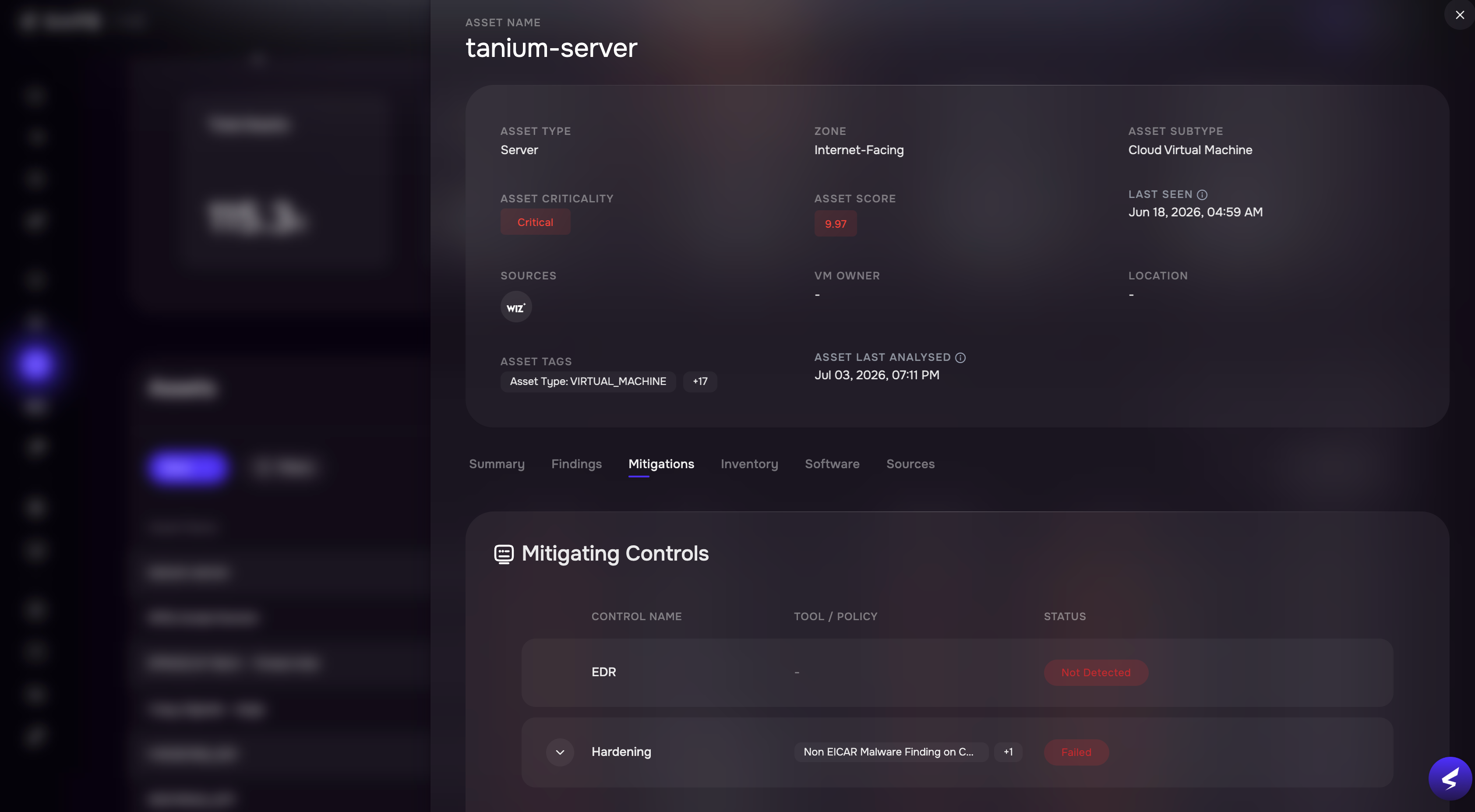
Asset Detail: Enriched with Mitigation & Software Details
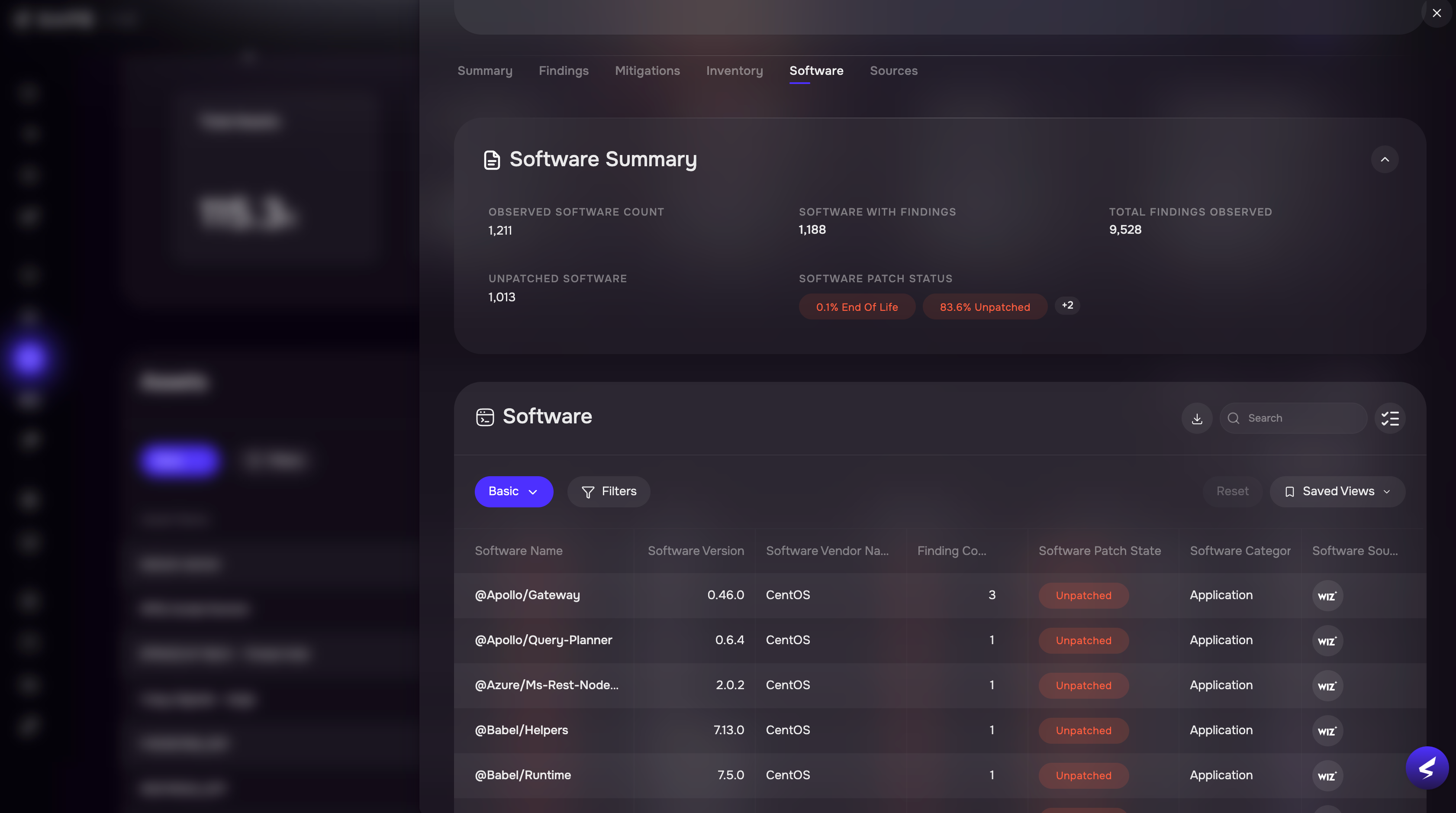
The Software tab displays software installed on the selected asset.
Information includes:
Software Name
Version
Vendor
Category
Patch State
Number of Findings
Note
The Software tab is available only when software inventory exists for the selected asset.
Software Inventory
Compensatory Controls introduces per-asset software inventory, allowing security teams to see what software is installed on each asset, its patch status, and how many findings are associated with each package.
The inventory is visible on the Asset Detail Software tab when software has been observed on the asset. It can be filtered by patch state and other software attributes. Software data can be exported using the Asset Softwares Report.
Software Export
A new asynchronous report type allows export of software inventory data across assets.
The export uses the existing SAFE reporting infrastructure. Users can trigger the report from the Asset Detail Software tab (Export button) or programmatically via the Reports API. Export columns include asset name, criticality, asset type, software name, version, vendor, source, install date, install path, category, sub-category, patch state, and finding count.