Overview
When SAFE ingests assets from multiple data sources (e.g., CrowdStrike, Wiz, Qualys, Tanium), it frequently receives overlapping reports about the same physical or virtual device. Without deduplication, a single laptop reported by three tools would appear as three separate devices, inflating asset counts, fragmenting vulnerability data, and undermining risk scores.
SAFE's asset deduplication engine solves this by comparing incoming asset attributes against existing inventory records and deciding whether to merge with an existing device or create a new one.
Key Principle
SAFE is source-agnostic. It does not matter which connector reports the device, what matters is the device's identity attributes.
The Five Identity Attributes
Every device in SAFE is identified by up to five primary attributes. These are listed in descending priority, higher-priority attributes override lower ones when making deduplication decisions.
Priority | Attribute | Description | Example |
|---|---|---|---|
1 (Highest) | Cloud Unique Identifier (UID) | A globally unique resource identifier from the cloud provider |
|
2 | Serial Number | The hardware or virtual machine serial number |
|
3 | Hostname | The device name (DHCP, DNS, or NetBIOS) |
|
4 | MAC Address | The network interface hardware address |
|
5 (Lowest) | IP Address | The network address assigned to the device |
|
Important Rules
At least one legacy attribute (hostname, MAC, or IP) is required. A device reported with only a UID or only a serial number but no hostname, MAC, or IP will be skipped.
Higher-priority attributes take precedence. If two assets share the same UID, they are the same device — even if their hostname, MAC, and IP are completely different.
Conflicting high-priority attributes mean different devices. If two assets have different UIDs (or different serial numbers with the same hostname), they are different devices — even if their MAC and IP match.
How the Priority Hierarchy Works
The deduplication engine processes incoming assets top-down through the priority hierarchy:
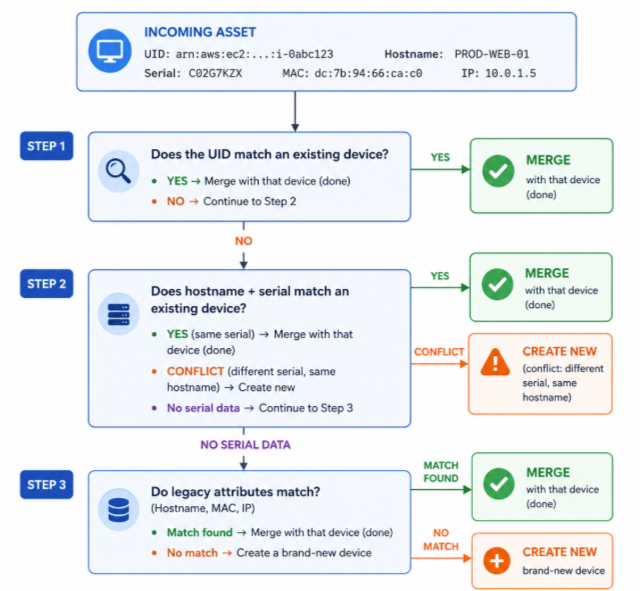
Match Priority Within Legacy Attributes
When comparing hostname, MAC, and IP against the database, the system uses a cascading priority:
Hostname + MAC + IP — all three match → strongest legacy match
Hostname + MAC — both match → strong match
Hostname + IP — both match → moderate match
MAC + IP — both match → moderate match
Hostname only — single match
MAC only — single match
IP only — weakest match (lowest fidelity)
If multiple database records match, the system picks the record with the highest match priority.
Deduplication Scenarios
Scenario 1: Same Cloud Instance from Two Connectors (UID Match)
Situation: A cloud VM is reported by both Wiz and CrowdStrike. Both connectors provide the cloud UID.
Attributes | Wiz Report | CrowdStrike Report |
|---|---|---|
UID |
|
|
Hostname |
|
|
Serial |
| — |
MAC |
|
|
IP |
|
|
Result: ✅ ONE device in the inventory.
Why: The UIDs match exactly. This is the highest-priority check. It does not matter that the MAC addresses and IP addresses differ — the UID conclusively identifies this as the same cloud instance.
What you see in the UI: One device named "MY-INSTANCE-1" with two data sources (Wiz and CrowdStrike) shown in the telemetry section.
Scenario 2: Same UID, Completely Different Legacy Attributes
Situation: A cloud instance was re-provisioned — it got a new hostname, MAC, and IP but keeps the same cloud resource identifier.
Attributes | First Sync (already in DB) | Second Sync (incoming) |
|---|---|---|
UID |
|
|
Hostname |
|
|
Serial |
|
|
MAC |
|
|
IP |
|
|
Result: ✅ ONE device (merged). The existing device is updated with the new attributes.
Why: UID match takes absolute precedence. The cloud provider guarantees this resource identifier is unique, so regardless of hostname/serial/MAC/IP changes, SAFE treats it as the same logical device.
Scenario 3: Different UIDs = Different Devices, Even with Same Hostname
Situation: Two AWS EC2 instances happen to share the same hostname "My-Instance-1" but have different resource ARNs (they are in different regions or accounts).
Attributes | Instance A | Instance B |
|---|---|---|
UID |
|
|
Hostname |
|
|
Serial |
|
|
MAC |
|
|
IP |
|
|
Result: ❌ TWO separate devices in the inventory.
Why: The UIDs are different. Despite every other attribute being identical, SAFE recognizes these are distinct cloud resources. The inventory will show two devices both named "MY-INSTANCE-1" — distinguishable by their Unique Identifier column.
Tip: Enable the "Unique Identifier" column in the asset list to distinguish devices with the same hostname.
Scenario 4: Same Hostname + Same Serial from Different Sources (Merge)
Situation: Qualys and Tanium both report a laptop. No cloud UID is available, but both provide the serial number.
Attributes | Qualys Report | Tanium Report |
|---|---|---|
UID | — | — |
Hostname |
|
|
Serial |
|
|
MAC |
|
|
IP |
|
|
Result: ✅ ONE device in the inventory.
Why: The hostname and serial number both match. Even though the MAC and IP differ (the laptop may have moved networks or is using different network interfaces), the serial number confirms this is the same physical hardware.
Scenario 5: Same Hostname, Different Serial Numbers (The "MacBook-Pro" Problem)
Situation: Two employees both have laptops named "MacBook-Pro-3" (a very common name). Without serial numbers, traditional deduplication would incorrectly merge them.
Attributes | Employee A's Laptop | Employee B's Laptop |
|---|---|---|
UID | — | — |
Hostname |
|
|
Serial |
|
|
MAC | — | — |
IP |
|
|
Result: ❌ TWO separate devices in the inventory.
Why: The serial numbers conflict. Even though the hostnames and IP addresses match, SAFE recognizes that different serial numbers mean different physical machines. A new device is force-created.
This is why serial number matters: Before this capability, common device names like "MacBook-Pro", "Laptop", or "DESKTOP-ABC" would cause unrelated devices to incorrectly merge.
Scenario 6: Serial Match Without Hostname
Situation: A connector reports a device with a serial number and MAC but no hostname. The DB already has a device with the same serial.
Attributes | Existing in DB | Incoming |
|---|---|---|
UID | — | — |
Hostname |
| — |
Serial |
|
|
MAC |
|
|
IP |
|
|
Result: ✅ ONE device (merged with the existing record).
Why: Serial number matches and MAC+IP confirm the identity. The existing hostname is preserved.
Scenario 7: UID Present but No Legacy Attributes (Device Skipped)
Situation: A connector reports a cloud asset with only a UID — no hostname, MAC, or IP.
Attributes | Incoming Asset |
|---|---|
UID |
|
Hostname | — |
Serial | — |
MAC | — |
IP | — |
Result: Device is SKIPPED — not ingested.
Why: SAFE requires at least one legacy attribute (hostname, MAC, or IP) to create or match a device record. The UID alone is insufficient because the deduplication engine needs a network-level identifier to properly place the device in inventory.
Scenario 8: Serial Number Present but No Legacy Attributes (Device Skipped)
Situation: A connector reports a device with only a serial number — no hostname, MAC, or IP.
Attributes | Incoming Asset |
|---|---|
UID | — |
Hostname | — |
Serial |
|
MAC | — |
IP | — |
Result: Device is SKIPPED — not ingested.
Why: Same rule as above. At least one of hostname, MAC, or IP must be present for the asset to be processed.
Scenario 9: MAC Address Match from Different Connectors
Situation: CrowdStrike reports only a hostname and MAC. Later, a vulnerability scanner reports only a MAC and IP. No UID or serial from either.
Attributes | CrowdStrike (already in DB) | Vulnerability Scanner (Incoming) |
|---|---|---|
UID | — | — |
Hostname |
| — |
Serial | — | — |
MAC |
|
|
IP | — |
|
Result: ✅ ONE device (merged). The existing device gains the IP address.
Why: MAC address is a reliable hardware identifier. When it matches, SAFE merges the records and enriches the device with the new IP information.
Scenario 10: IP-Only Device, Then Richer Data Arrives
Situation: A network scanner first reports a device with only an IP address. Later, a more capable tool reports the same IP with a hostname and MAC.
Attributes | Network Scanner (already in DB) | Endpoint Agent (incoming) |
|---|---|---|
UID | — | — |
Hostname | — |
|
Serial | — | — |
MAC | — |
|
IP |
|
|
Result: ✅ ONE device (merged). The device is upgraded with hostname and MAC.
Why: The IP matches the existing record. Since the existing record has no higher-fidelity attributes that would conflict, the new data enriches it.
Scenario 11: Multi-Source Convergence (Three Connectors, One Device)
Situation: The same physical device is reported by three different connectors with overlapping but not identical attributes.
Attributes | CrowdStrike | Wiz | Qualys |
|---|---|---|---|
UID | — |
| — |
Hostname |
| — |
|
Serial | — | — |
|
MAC |
|
| — |
IP | — |
|
|
Processing order matters but the end result is the same:
CrowdStrike arrives first → New device created (Hostname + MAC).
Wiz arrives → UID doesn't match any existing UID. Falls to serial path. No serial. Falls to legacy match: MAC matches → Merges with device from step 1. UID is now stored against the device.
Qualys arrives → No UID. Serial
A12345+ HostnameMacBook-Pro-1→ Hostname matches existing device → Merges.
Result: ✅ ONE device with all three connectors shown in telemetry.
Scenario 12: UID Match Found but Also Multiple Serial Matches in DB
Situation: An asset with UID matches one device, but its hostname+serial also partially match other devices in the database.
Attributes | DB Device 1 | DB Device 2 | DB Device 3 | Incoming |
|---|---|---|---|---|
UID |
| — | — |
|
Serial |
|
|
|
|
MAC |
|
|
|
|
IP |
|
|
|
|
Hostname |
|
| — |
|
Result: Merges with DB Device 1 (the UID-matched device).
Why: UID match is always conclusive and takes the highest priority. Even though Device 2 matches on hostname + serial + MAC + IP, the UID match wins.
Scenario 13: Hostname Match with Serial Confirmation
Situation: An incoming device has hostname + serial. The DB has one device with the same hostname and same serial, and another with the same hostname but no serial.
Attributes | DB Device 1 | DB Device 2 | Incoming |
|---|---|---|---|
UID | — | — | — |
Serial |
| — |
|
MAC |
|
|
|
IP |
|
|
|
Hostname |
|
|
|
Result: Merges with DB Device 1 (highest match score: serial + hostname).
Why: The match priority matrix scores each candidate. Device 1 matches on serial AND hostname (high score). Device 2 matches only on hostname and IP (lower score). The higher score wins.
Scenario 14: Hostname Match but Serial Conflict (Force-Create)
Situation: Incoming device has hostname "My-Instance-1" and serial "A12345". DB has a device with the same hostname but a DIFFERENT serial "B98765".
Attributes | Existing in DB | Incoming |
|---|---|---|
UID | — | — |
Hostname |
|
|
Serial |
|
|
MAC |
|
|
IP |
|
|
Result: ❌ TWO separate devices (force-create).
Why: The serial numbers conflict. A serial number mismatch is treated as conclusive evidence that these are different physical machines — regardless of hostname match. This prevents the common-name problem (e.g., multiple laptops named "MacBook-Pro").
The Match Priority Matrix
When the deduplication engine searches the database, it scores each candidate record based on which attributes match. The highest-scoring candidate wins.
When Incoming Asset Has UID
Priority | Matching Criteria | Outcome |
|---|---|---|
Highest | UID matches exactly | Merge (unconditional) |
Then falls to serial number path if no UID match... |
|
|
Note
Only ONE device can exist against a given UID in the database. If the UID matches, that's the definitive answer.
When Incoming Asset Has Serial Number (No UID Match)
The system builds a match score based on which attributes match between the incoming asset and each DB candidate:
Score Component | Weight | Condition |
|---|---|---|
Serial Number | Highest bit | Incoming serial = DB serial (conflict = skip candidate entirely) |
Hostname | High bit | Incoming hostname matches DB hostname |
MAC Address | Medium bit | Incoming MAC = DB MAC |
IP Address | Low bit | Incoming IP = DB IP |
The candidate with the highest combined score is selected. If no candidate scores above zero, a new device is created.
Critical rule: If the incoming device has a serial number AND a DB candidate has a different serial number, that candidate is excluded from consideration (serial conflict = guaranteed different device).
When Incoming Asset Has No UID and No Serial
Falls back to traditional hostname/MAC/IP matching with the cascading priority described in Section 3.
What Triggers a New Device vs. Merging
Condition | Outcome |
|---|---|
UID matches a DB device | Merge — always |
UID is present but doesn't match any DB device | New device (force-create) |
Same serial + any matching legacy attribute | Merge |
Different serial, same hostname | New device (force-create) |
No UID, no serial, hostname matches | Merge |
No UID, no serial, MAC matches | Merge |
No UID, no serial, only IP matches | Merge (lowest confidence) |
No legacy attributes at all (only UID or only serial) | Skipped — not ingested |
No matching attributes in DB | New device |
Hostname Special Cases
Common Device Names
SAFE recognizes that certain device names are too generic to be reliable deduplication anchors. Names like "MacBook-Pro", "Laptop", "iPhone", "iPad" are treated as common names and are excluded from hostname-based matching when no MAC address is available.
If a device arrives with only a common name and no MAC, it is skipped to prevent incorrect merging.
Hostname Normalization
Before matching, hostnames go through normalization: - Case insensitive: PROD-WEB-01 and prod-web-01 are treated as the same. - Domain stripped: server.corp.example.com becomes SERVER (unless FQDN mode is enabled for the network). - IP-based names ignored: Names like IP-10-0-1-5 or CISCO-192-168-1-1 are stripped — the IP is extracted and used as the IP attribute instead. - NetBIOS truncation handled: NetBIOS names can be truncated to 15–16 characters. SAFE accounts for this when comparing.
FQDN-Enabled Networks
For networks with FQDN (Fully Qualified Domain Name) retention enabled: - server.us.corp.com and server.eu.corp.com are treated as different devices. - server (without domain) can still match server.us.corp.com via indirect matching.
FAQ / Common Questions
Q: Why do I see two devices with the same name?
A: This happens when two physically different devices share the same hostname but have different serial numbers or different UIDs. Enable the "Unique Identifier" and "Serial Number" columns in the asset list to see why they're kept separate.
Q: A device changed its IP address. Will SAFE create a duplicate?
A: No. If the device has a UID, serial number, or hostname that matches an existing record, it will merge with the existing device and the IP will be updated.
Q: What if a device has no hostname, no MAC, and only an IP?
A: It will be ingested as an IP-only device. If another device later arrives with the same IP plus a hostname, they will merge and the record will be enriched.
Q: Do different connectors create separate devices?
A: No. SAFE is source-agnostic. If two connectors report the same device (matching on UID, serial, hostname, MAC, or IP), they merge into a single device with multiple data sources shown in telemetry.
Q: What happens if a cloud instance is terminated and a new one gets the same hostname?
A: If the new instance has a different UID, it becomes a separate device — even with the same hostname. This is by design: cloud UIDs are unique per resource lifecycle.
Q: My connector doesn't provide a serial number or UID. How does deduplication work?
A: SAFE falls back to legacy attribute matching (hostname > MAC > IP). This works well for most cases but may not handle the "common name" problem (multiple "MacBook-Pro" devices). If your connector can provide serial numbers or UIDs, enabling them improves deduplication accuracy.
Q: What is "force-create"?
A: When the system detects a definitive conflict (e.g., two different UIDs or two different serial numbers with the same hostname), it bypasses normal matching and creates a new device regardless of other attribute overlaps.
Q: Can two devices with the same MAC address exist?
A: Under normal operation, no — MAC address match always merges. However, if one device has a UID and another doesn't (or they have different UIDs), the UID-level decision takes priority and may keep them separate.
Q: Why was my device skipped / not ingested?
A: A device is skipped if: 1. It has no valid legacy attributes (no hostname, no MAC, no IP) 2. It has only a common name (like "MacBook-Pro") with no MAC address 3. Its IP is a loopback (127.0.0.1) or APIPA (169.254.x.x) address