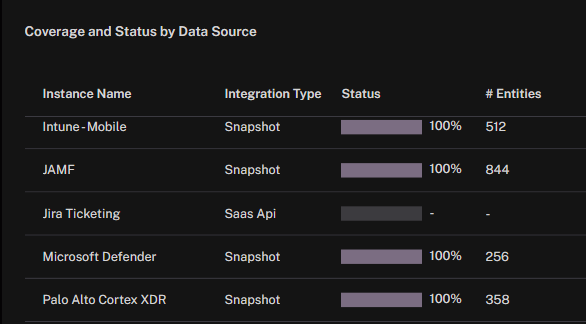
The Coverage and Status by Data Source widget provides a detailed view of ingestion completeness for each connector. It allows you to confirm that integrations are active, measure how much data has been successfully ingested, and spot gaps where expected entities are missing.
Instance Name identifies the specific connector instance (for example, Intune – Mobile, JAMF, Jira Ticketing).
Integration Type shows how data is ingested, such as periodic Snapshot loads or continuous SaaS API connections.
Status indicates the ingestion success rate as a percentage, with a progress bar for quick visualization. A value of 100% means all expected entities for that source have been successfully ingested.
# Entities lists the total number of ingested entities associated with that instance.
Sources that show dashes in Status and # Entities indicate that no data has been received yet, even if the integration has been configured.
This widget helps ensure that all configured connectors are delivering their data as expected, making it easy to verify integration health, track ingestion completeness, and prioritize follow-up for underperforming sources.
See Also: