You can find these options in the Apps menu.
What You Can Do Here
Monitor application coverage using the Total Apps and Apps by Data Sources metrics.
Evaluate operational insights with the Apps Telemetry view.
Identify vulnerable applications through the Apps with Exposures panel.
Filter application data using the Add Filter and Advanced Filters controls.
Perform exports, configure automation, or adjust the table using the Create Automation, Export, and Edit Columns links.
Access detailed application data through the Summary and Inventory Details tabs.
Review application security issues in the Findings tab.
Examine deployment context through the Infrastructure tab.
You can also see the walkthrough in this link
Summary
.jpg)
The Summary tab displays the following information:
Findings Summary
Findings by Type
Top Findings
Inventory Details
.jpg)
The Inventory Details tab shows the following information:
General Attributes
Name
type
URL
Website IP
Group
Alias
IDE
Parent Domain
Status
Top Level App
Owner Attributes
Business Owner
VM Owner
Application Owner
IT Owner
Tags
Data Sources
Findings
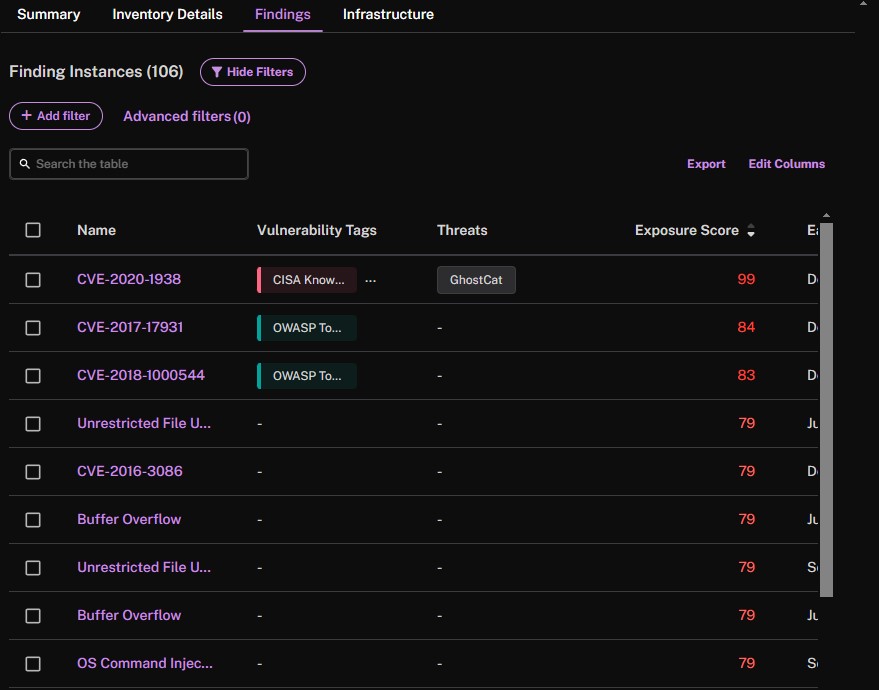
The Findings tab displays all the findings related to the app.
Infrastructure
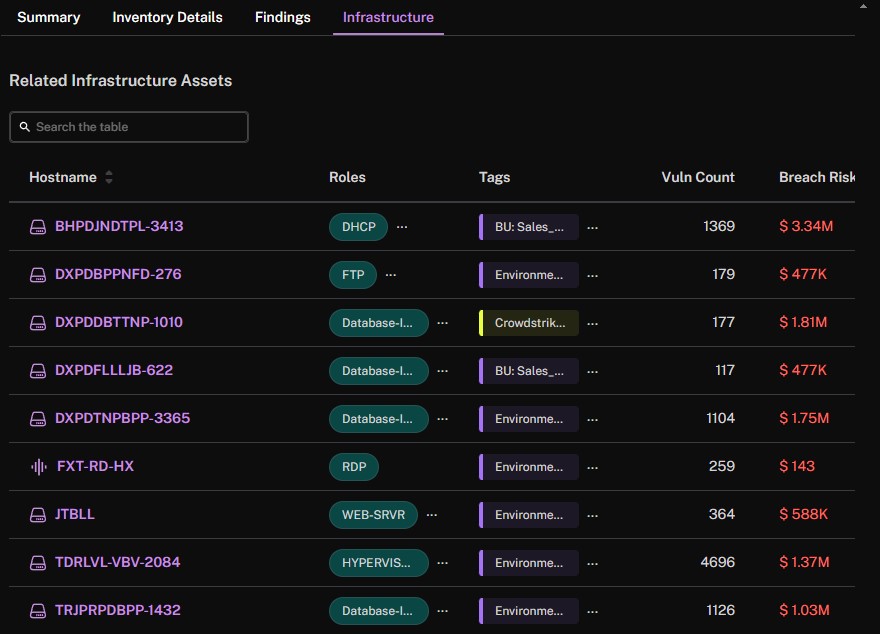
The Infrastructure tab shows all the infrastructure (assets) related to the app.