Introduction
Use the Create Ticket node when you want SAFE to automatically create a ticket for findings matching specific criteria.
For example, you could create a workflow that periodically identifies critical findings and creates a ticket for the matching scope.
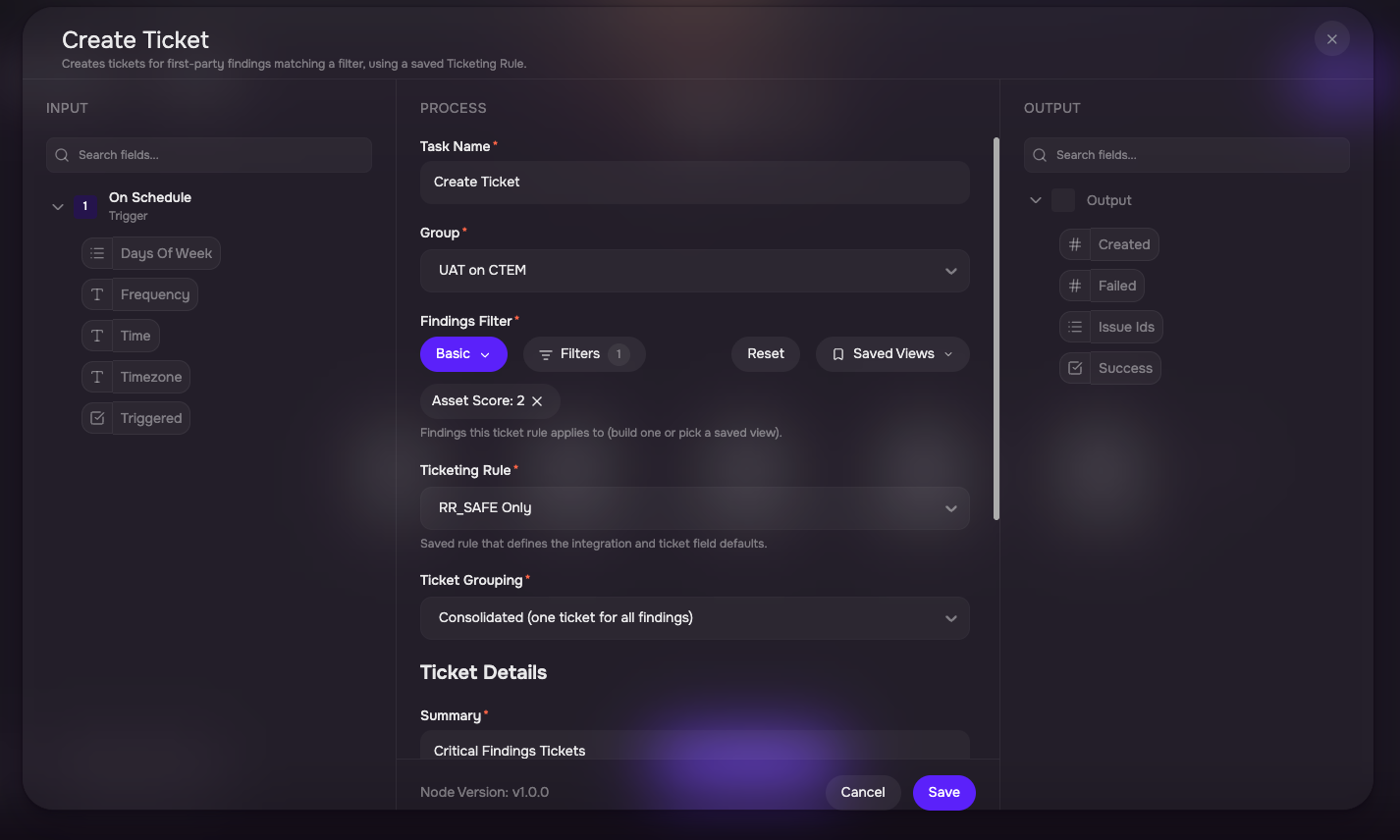
Configure the Create Ticket Workflow
Add the Create Ticket node to the workflow.
Select the applicable Group.
Define the Findings Filter.
Select a previously configured Ticketing Rule.
Configure any additional ticket fields presented by the selected rule.
Save the node.
The fields displayed in the Create Ticket node depend on the selected Ticketing Rule.
For an internal ticketing rule, the available fields include; Summary, Priority, Assignee, Due Date, and Description
For an external ticketing rule, SAFE displays the fields required by the destination integration. For example, a Jira ticketing rule can present the corresponding Jira fields.
Values can either be entered directly or populated using output. If the fields are not changed, the configuration saved in the Ticketing Rule is used.
How Tickets Are Grouped
The Create Ticket workflow action creates a consolidated ticket for the findings resolved by the configured filter.
It does not create a separate ticket for every individual finding.
A saved Ticketing Rule is required before the node can create a ticket.
Re-running Ticket Workflows
Re-running the same ticket workflow does not create duplicate tickets for findings that have already been ticketed. If all matching findings have already been ticketed, SAFE skips that step.