You can also see the walkthrough in this link
In the Asset Vulnerabilities menu, you can create filters and advanced filters for Unique Vulnerabilities and Vulnerability Instances.
Filters are used in automations.
You can create filters based on the following attributes:
Publish Date
CVSS v3.x Score
CVSS v3.x Severity
Threats
Vulnerability Tags
Has Ticket
Has Remediation Project
Exposure Score
Exposure Severity
State
Roles
Asset Tags
Site
Location: City
Location: State
Location: Country
Location: Region
Groups
CVSS v2.0 Score
CVSS v2.0 Severity
Earliest Observation
Latest Observation
Type
CWE IDs
MITRE ATT&CK IDs
Age: Since Publish Date
Threat Level
EPSS Score
EPSS Percentile
Data Sources
Age: Since Earliest Observation
Is Fix Available
Asset Type
Asset Subtype
Component Category
Component Name
Software Vendor
Due Date
Component Version
OS Platform
Operating System
OS Version
Is Cloud Asset
Roll-Up VM Owner
Advanced filters apply boolean logic in the following way. Within a group, the attributes are evaluated as AND. Groups are evaluated with OR.
For example, the following advanced filter:
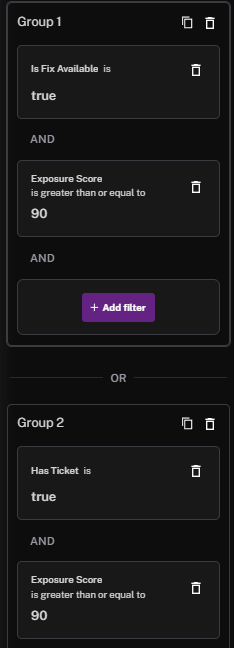
Is being evaluated with this boolean logic:
(Is Fix Available = true AND Exposure Score >= 90) OR (Has Ticket = true AND Exposure Score >= 90)
See Also: