You can also see the walkthrough in this link
In the Assets menu, you can create filters, and advanced filters.
Filters are used in automations.
You can create filters based on the following attributes:
Hostname
Asset Type
Site
Roles
Tags
OS Platform
Vuln Count
Groups
OS Patch State
Business Owner
Asset Subtype
Manufacturer
Operating System
Data Sources
Earliest Observation
Latest Observation
MAC Address
Cloud Unique ID
Serial Number
Latest analysis
OS Architecture
OS Vendor
OS Version
Last Seen By Balbix HA
CPU Cores
CPU Model Name
SMBIOS Version
System Model
Total Physical Memory
BIOS Release Date
BIOS Vendor
BIOS Version
Cloud Account ID
Is Running Cloud Asset
Is Cloud Asset
OS Installation Date
Cloud Service Provider
Latest Installed OS Patch
Network Zone
IP Address
Latest Installed OS Patch Publish Date
Latest OS Patch Install Date
Earliest Pending OS Patch
Location: Region
Location: Country
Location: State
Location: City
PowerShell Execution Policy
Is SMBv1 Enabled
Is SMBv2 Enabled
Is SMBv3 Enabled
Is Domain Joined
Windows Domain Name
Windows Domain Role
Is Manually Categorized
Is Reboot Pending
Is Bastion Asset
VM Owner
IT Owner
Latest Pending OS Patch
Is Disk Encrypted
Primary User
Max Exposure Score
Max Exposure Severity
Risk Score
Software Vendor
Software Category
Software Product
Software Product Version
Device Patch State
Software Patch State
Cloud Asset Type
Is Mission Critical
Roll-Up VM Owner
Geolocation
Breach Risk
Breach Likelihood
Breach Impact
Cloud Instance ID
Subnet
Cloud Resource Group Name
Cloud Region
External IP Address
Earliest Pending OS Patch Publish Date
Is Secure Boot Enabled
OS Release Date
Latest Pending OS Patch Publish Date
Windows Update Configuration
Windows Update Server
Windows Update Server Reachability
Last Successful Windows Update Check
Data Sources: Observing Sensors
OS Product Version
Residual Likelihood
Accepted Likelihood
Inherent Likelihood
Mitigated Likelihood
Accepted Risk
Risk Inherent
Mitigated Risk
SLA Compliance Status
Advanced filters can be implemented using the following attributes:
Hostname
Asset Type
Site
Roles
Tags
OS Platform
Vuln Count
Groups
OS Patch State
Business Owner
Asset Subtype
Manufacturer
Operating System
Data Sources
Earliest Observation
Latest Observation
MAC Address
Cloud Unique ID
Serial Number
Latest analysis
OS Architecture
OS Vendor
OS Version
Last Seen By Balbix HA
CPU Cores
CPU Model Name
SMBIOS Version
System Model
Total Physical Memory
BIOS Release Date
BIOS Vendor
BIOS Version
Cloud Account ID
Is Running Cloud Asset
Is Cloud Asset
OS Installation Date
Cloud Service Provider
Latest Installed OS Patch
Network Zone
IP Address
Latest Installed OS Patch Publish Date
Latest OS Patch Install Date
Earliest Pending OS Patch
Location: Region
Location: Country
Location: State
Location: City
PowerShell Execution Policy
Is SMBv1 Enabled
Is SMBv2 Enabled
Is SMBv3 Enabled
Is Domain Joined
Windows Domain Name
Windows Domain Role
Is Manually Categorized
Is Reboot Pending
Is Bastion Asset
VM Owner
IT Owner
Latest Pending OS Patch
Is Disk Encrypted
Primary User
Max Exposure Score
Max Exposure Severity
Risk Score
Software Vendor
Software Category
Software Product
Software Product Version
Device Patch State
Software Patch State
Cloud Asset Type
Is Mission Critical
Roll-Up VM Owner
Advanced filters apply boolean logic in the following way. Within a group, the attributes are evaluated as AND. Groups are evaluated with OR.
For example, the following advanced filter:
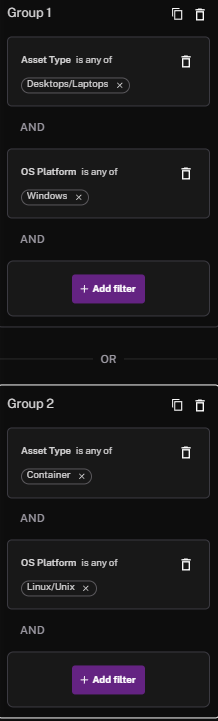
Is being evaluated with this boolean logic:
(AssetType = "Desktops/Laptops" AND OSPlatform = "Windows") OR (AssetType = "Container" AND OSPlatform = "Linux/Unix")
See Also: