You can find these options in the BIX menu.
You can also see the walkthrough in this link
BIX is a conversational AI-powered cybersecurity assistant built into the Balbix platform and available through the BIX iOS app. Designed for security professionals and organizations, BIX uses generative AI to deliver advanced conversational capabilities. By leveraging state-of-the-art AI models, BIX processes your questions and generates tailored, context-aware responses, providing actionable insights into your organization's cybersecurity posture.
With BIX, you can identify top risks, track remediation efforts, gain clarity on vulnerabilities or exposures, and create role-based responses and summaries. This streamlined access to critical cybersecurity information enhances decision-making and supports proactive risk management. Whether you're at your desk or on the go, BIX ensures you have the insights you need to protect your organization effectively.
Why should you use BIX?
BIX simplifies cybersecurity by providing fast and reliable answers to complex questions. Instead of waiting for lengthy analyses, you can quickly assess your environment, explore industry standards, and receive tailored guidance to address potential threats. By delivering immediate, actionable insights, BIX helps stakeholders manage cyber risk effectively and empowers organizations to strengthen their cybersecurity posture with confidence.
BIX delivers significant value to users through several standout features:
Rapid Responses: Quickly ask questions and get instant, accurate answers, reducing the time spent searching for information.
Customized Insights: BIX analyzes your organization’s unique data to provide tailored recommendations, such as identifying top risk issues, vulnerabilities, and misconfigurations, or delivering real-time remediation updates and detailed reports.
Continuous Learning: Powered by machine learning, BIX continually improves its responses based on user interactions to ensure accurate, up-to-date information.
User-Friendly Interface: Designed for ease of use, BIX is accessible to users of all technical levels, offering a seamless experience.
BIX iOS App: Stay connected on the go with the BIX iOS app, offering instant access to critical security insights without needing to log in to your computer.
What can you ask BIX?
You can ask BIX a wide range of questions to help you understand, analyze, and act on your cybersecurity data. Want to dig into your cybersecurity insights? You can ask BIX questions such as:
"What are the top vulnerabilities in my environment?"
"Which assets are most likely to be breached?"
Or maybe you’re interested in your workflows and remediation. You can ask BIX things like:
“What is the mean time to remediate vulnerabilities in my organization?"
"How many IoT devices need immediate patching?"
If you need more details or want to refine your query, you can continue the conversation with BIX. The AI assistant maintains context and provides additional assistance as needed.
When you’re finished, close the chat window. To reopen BIX, click the BIX icon in the left navigation bar whenever you need help.
By following these steps, you can use BIX to quickly access essential cybersecurity information without navigating through reports or dashboards. Simply ask a question and receive real-time, actionable insights. The next time you're in Balbix, ask BIX a question to experience the convenience of AI-powered cybersecurity management.
.gif "2024-11-20_21-03-57 (1).gif")
QUICK START GUIDE
The BIX Quick Start Guide helps you get started with Balbix’s conversational AI-powered cybersecurity assistant. Learn how to access BIX, explore its key features, and use it effectively to enhance your security operations.
Accessing BIX
To start using BIX:
Click BIX in the left navigation bar.
The BIX chat window will open, displaying common queries at the top.
Type your question to begin the interaction.
Key Features
The iOS BIX app includes all core functionalities of the web version, with added features optimized for mobile:
Security best practices: Get tailored guidance on cybersecurity best practices for your business needs.
Incident response guidance: Access step-by-step instructions for responding to security incidents.
24/7 availability: Use BIX anytime for cybersecurity questions. The BIX mobile app keeps you updated with real-time reports and essential information on the go.
Comprehensive search: BIX examines resources like Balbix blogs, help sections, and materials to deliver accurate, helpful answers.
Chat history: Review interactions from the last two weeks to reference key information, track issues, and maintain continuity.
Push notifications: Get updates on important reports, such as daily or weekly CVE reports, patch Tuesday updates, or project thresholds.
Email responses: Request answers to be sent directly to your inbox for easy access and sharing.
Installation
To install the iOS BIX app:
Open the App Store: Launch the App Store on your iPhone.
Search for the app: Enter “BIX” in the search bar.
Select the app: Choose “BIX by Balbix” from the results.
Tap download: Tap the Get button to start the download.
Install the app: Wait for the installation to complete.
Launch the app: Open the app by tapping the BIX icon on your device.
Getting Started
After installing the app:
Open the app: Tap the BIX icon. First-time users may need to sign in.
Sign in: Log in with your Balbix account credentials.
Ask BIX: Use the chat interface to type your queries. Ask about cybersecurity, exposure management, troubleshooting, or perform tasks supported by the Balbix platform. (Include a link to the “Types of Questions You Can Ask BIX” article.)
Use advanced features: Access these options in the app settings:
Push notifications: Get updates on important events and alerts.
Debug menu: View session IDs for troubleshooting or support.
D3 model info: Review your conversation history for reference.
Haptic feedback: Enable or disable physical cues for notifications and selections.
BIX for Apple iOS
The iOS BIX app brings Balbix’s conversational AI-powered cybersecurity assistant to your mobile device, offering flexibility and convenience wherever you are. With mobile devices playing a key role in communication, browsing, and work management, seamless access to BIX on the go enhances your overall experience.
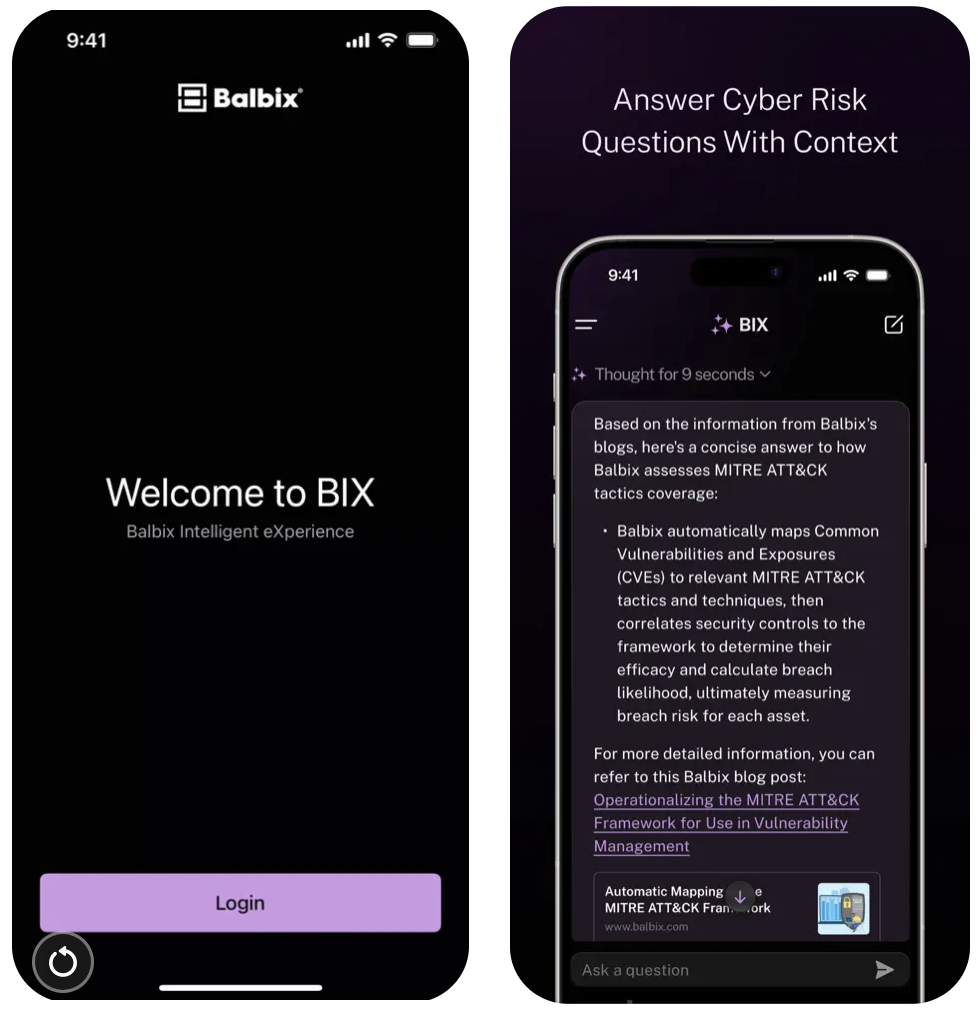
Why use the iOS BIX app?
Anywhere, anytime access: Use BIX from home, while traveling, or at work, without needing a desktop or laptop.
Real-time responsiveness: Receive instant alerts and responses through push notifications and mobile-optimized interactions.
Optimized user experience: Interact with BIX more naturally using a touch-friendly interface.
With its user-friendly features, simple installation process, and mobile-friendly design, the iOS BIX app helps you stay productive, manage tasks, and make informed decisions with ease.
Key features
The iOS BIX app includes all core functionalities of the web version, with added features optimized for mobile:
Security best practices: Get tailored guidance on cybersecurity best practices for your business needs.
24/7 availability: Use BIX anytime for cybersecurity questions. The BIX mobile app keeps you updated with real-time reports and essential information on the go.
Comprehensive search: BIX examines additional resources like Balbix blogs, help sections, and materials to deliver accurate, helpful answers.
Chat history: Review interactions from the last two weeks to reference key information, track issues, and maintain continuity.
Push notifications: Get updates on important reports, such as daily or weekly CVE reports, patch Tuesday updates, or project thresholds.
Email responses: Request answers to be sent directly to your inbox for easy access and sharing.
Installation
To install the iOS BIX app:
Open the App Store: Launch the App Store on your iPhone.
Search for the app: Enter “BIX” in the search bar.
Select the app: Choose “BIX by Balbix” from the results.
Tap download: Tap the Get button to start the download.
Install the app: Wait for the installation to complete.
Launch the app: Open the app by tapping the BIX icon on your device.
Getting started
After installing the app:
Open the app: Tap the BIX icon. First-time users may need to sign in.
Sign in: Log in with your Balbix account credentials.
Ask BIX: Use the chat interface to type your queries. Ask about cybersecurity, exposure management, troubleshooting, or perform tasks supported by the Balbix platform. (Include a link to the “Types of Questions You Can Ask BIX” article.)
Use advanced features: Access these options in the app settings:
Push notifications: Get updates on important events and alerts.
Debug menu: View session IDs for troubleshooting or support.
D3 model info: Review your conversation history for reference.
Haptic feedback: Enable or disable physical cues for notifications and selections.
BIX FAQs
BIX provides predefined insights to help you get started quickly:
Top Risk Issues
This use case provides an overview of the most critical risk issues in your organization, as identified by Balbix. Examples include:
Bad certificates on mission-critical assets
Obsolete and vulnerable applications
Unpatched operating systems
Cloud security misconfigurations
Data protection concerns
These insights prioritize the risks that require immediate attention, helping you focus on mitigation strategies effectively.
Top Unpatched Vulnerabilities
This use case highlights the top five vulnerabilities that pose significant threats to your organization. For each vulnerability, BIX provides details such as the total number of affected entities, and guides you through further analysis. Addressing these vulnerabilities allows you to plan efficient remediation strategies.